

Link your NHS login
NHS login – a single, secure login that enables you to swiftly access health and social care apps and websites wherever you see the NHS login button.
Why use NHS login?
Our recent integration with NHS login allows users to create new Yellow Card scheme accounts using NHS login, or link to an existing Yellow Card scheme account. This provides users with an alternative login route using an existing username and password, reducing the need to remember an additional set of credentials. It also allows for a seamless transition between websites.
Creating a Yellow Card scheme account
You can now create a Yellow Card scheme account using your NHS login. To do this, follow the below steps:
Go to the registration page of the Yellow Card scheme website and press the ‘Continue to NHS login’ button.

You will be redirected to the NHS login page to input your NHS login username and password and complete authentication.
You will then be asked to share this personal information with the Yellow Card scheme. If you accept, a Yellow Card scheme account will be created with your NHS login.
You will then be automatically directed back to the Yellow Card scheme website and be asked if you would like to link your NHS login to an existing Yellow Card scheme account. ⚠️ Please note, if you decline to link at this stage, you will not be able to link again in future, and your accounts will remain completely separate. ⚠️
If you choose to link to your existing Yellow Card scheme account straight away, you will be required to input your Yellow Card scheme account login details and configure multi-factor authentication (MFA). You can find further information on the MFA webpage.
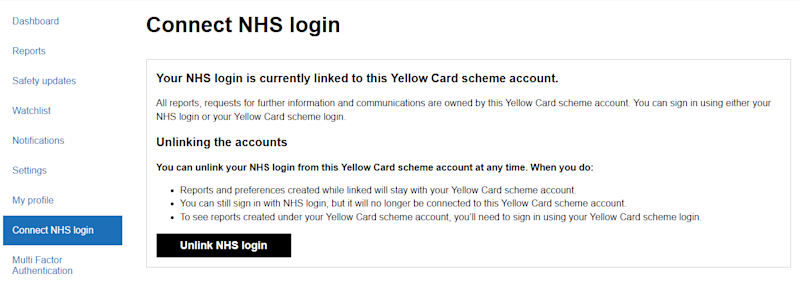
Once completed, you will be routed into your Yellow Card scheme account, which is now linked to your NHS login. You can view and manage your accounts via the ‘Connect NHS login’ tab.
Linking an existing Yellow Card scheme account
You can also link your existing Yellow Card scheme account to NHS login directly from your account. This will allow you to access your account using your NHS login details in future. To set this up, follow the below steps:
Go to the Yellow Card sign in page and press the ‘Continue to Yellow Card login’ button.

Once logged in, go to the ‘Connect NHS login’ tab within your account, as shown below.
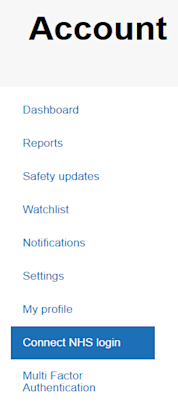
Click ‘Continue to NHS login’ which will redirect you to the NHS login page to input your NHS login username and password, complete authentication, and share your personal information with the Yellow Card scheme.
Once completed, your NHS login account will be linked to your Yellow Card scheme account. This linkage can be removed from the ‘Connect NHS login’ tab should you wish to do so.
What to do if you experience issues with NHS login
NHS login is not owned or managed by the MHRA. Help with technical issues can be located on the NHS login webpage.
Please be assured that you can still submit Yellow Card reports without logging in; however, guest submissions won’t appear in your account. We can retrospectively link your report to an account if you provide the reference number and your email address to mailbox yellow.card@mhra.gov.uk.